Python - Connect to Oracle DB Examples
cx_Oracle is a Python extension module that enables access to Oracle Database and conforms to the Python database API specification. This module is currently built against version for Oracle Client 11.2 onwards and Python 2.7, 3.4, 3.5 and 3.6.
cx_Oracle can be downloaded from https://pypi.python.org/pypi/cx_Oracle
However, the fastest way to install cx_Oracle 6 Beta is with pip:
python -m pip install cx_Oracle –pre
oracle_example1.py
|
import cx_Oracle
# connect via SQL*Net string or by each segment in a separate argument
# connection = cx_Oracle.connect("user/password@TNS")
connection = cx_Oracle.connect("scott", "tiger", "testdb")
cursor = connection.cursor()
cursor.execute("""
select empno,ename,job,sal,deptno
from emp
order by deptno,ename
"""
)
print("empno \t ename\t\t job \t\t sal \t\t deptno \t")
print("===== \t ======\t\t ========== \t ====== \t ====== \t")
for empno, ename, job, sal, deptno in cursor: print(str(empno).ljust(8),ename.ljust(15),job.ljust(15),
str(sal).ljust(15),str(deptno).ljust(15))
cursor.close()
connection.close()
|
Python 3.6.1 (v3.6.1:69c0db5, Mar 21 2017, 17:54:52) [MSC v.1900 32 bit (Intel)] on win32
Type "copyright", "credits" or "license()" for more information.
>>>
===== RESTART: C:\\Python-Know-how\oracle_example1.py =====
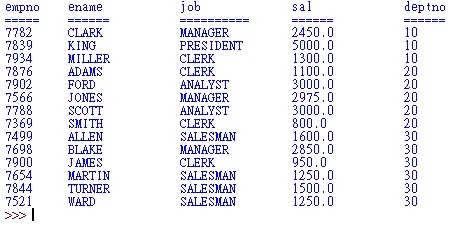
oracle_example2.py
|
import cx_Oracle
# connect via SQL*Net string or by each segment in a separate argument
# connection = cx_Oracle.connect("user/password@TNS")
connection = cx_Oracle.connect("scott", "tiger", "testdb")
cursor = connection.cursor()
v_deptno = input("Please enter the department number:")
cursor.execute("""
select empno,ename,job,sal,deptno
from emp
where deptno = :arg_1
""",
arg_1 = v_deptno
)
print("empno \t ename\t\t job \t\t sal \t\t deptno \t")
print("===== \t ======\t\t ========== \t ====== \t ====== \t")
for empno, ename, job, sal, deptno in cursor:
print(str(empno).ljust(8),ename.ljust(15),job.ljust(15),
str(sal).ljust(15),str(deptno).ljust(15))
cursor.close()
connection.close()
|
Python 3.6.1 (v3.6.1:69c0db5, Mar 21 2017, 17:54:52) [MSC v.1900 32 bit (Intel)] on win32
Type "copyright", "credits" or "license()" for more information.
>>>
===== RESTART: C:\\Python-Know-how\oracle_example2.py =====

===== RESTART: C:\\Python-Know-how\oracle_example2.py =====

oracle_example3.py
|
import cx_Oracle
import os, sys
# connect via SQL*Net string or by each segment in a separate argument
# connection = cx_Oracle.connect("user/password@TNS")
connection = cx_Oracle.connect("scott", "tiger", "testdb")
cursor = connection.cursor()
v_deptno = input("Please enter the department number:")
cursor.execute("""
select empno,ename,job,sal,deptno
from emp
where deptno = :arg_1
""",
arg_1 = v_deptno
)
fd = os.open("Dept-"+v_deptno+".txt", os.O_RDWR | os.O_CREAT)
os.write(fd, b"Empno Ename Job Sal Deptno \n")
os.write(fd, b"===== ====== ========== ====== ====== \n")
for empno, ename, job, sal, deptno in cursor:
v_tuple = str(empno).ljust(8),ename.ljust(15),job.ljust(15),
str(sal).ljust(15),str(deptno).ljust(15),"\n"
v_string = ''.join(v_tuple)
v_bytes = str.encode(v_string)
os.write(fd,v_bytes)
cursor.close()
connection.close()
os.close(fd)
|

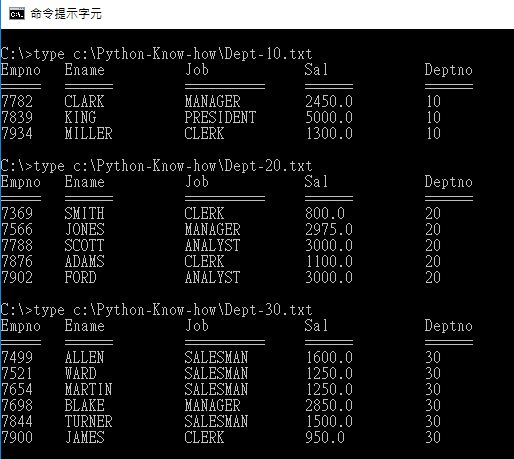
[Reference]
https://oracle.github.io/python-cx_Oracle/
https://github.com/oracle/python-cx_Oracle
https://docs.python.org/3/library/os.html

請先 登入 以發表留言。