阿榮福利味提供Adobe Flash Player 離線安裝版,可完整移除舊版的Flash Player, 並可安裝最新版的Flash Player, 就可以排除應用程式初始化錯誤的問題:
以下為下載的連結:
https://www.azofreeware.com/search/label/%5B%E6%9C%80%E6%96%B0Flash%20Player%E9%9B%A2%E7%B7%9A%E5%AE%89%E8%A3%9D%E7%89%88%5D
例如:
DanBrother 發表在 痞客邦 留言(0) 人氣(1,601)
To Install Chrome for Your Own User Account: (目前Windows使用者適用):
DanBrother 發表在 痞客邦 留言(1) 人氣(475)
Windows Batch Command for Checking Backup Files (n Days Ago)
Check_Backup_Today.bat
>>
echo off
set disk=F:\Disk
set today=%date:~0,4%-%date:~5,2%-%date:~8,2%
dir %disk%\%today%\* /s/p
pause
echo on
Check_Backup_Yesterday.bat
>>
echo off
set disk=F:\Disk
for /f "usebackq" %%i in (`PowerShell $date ^= Get-Date^; $date ^= $date.AddDays^(-1^)^; $date.ToString^('yyyy-MM-dd'^)`) do set yesterday=%%i
dir %disk%\%yesterday%\* /s/p
pause
echo on
Check_Backup_Two_Days_Ago.bat
>>
echo off
set disk=F:\Disk
for /f "usebackq" %%i in (`PowerShell $date ^= Get-Date^; $date ^= $date.AddDays^(-2^)^; $date.ToString^('yyyy-MM-dd'^)`) do set two_days_ago=%%i
dir %disk%\%two_days_ago%\* /s/p
pause
echo on
DanBrother 發表在 痞客邦 留言(0) 人氣(35)
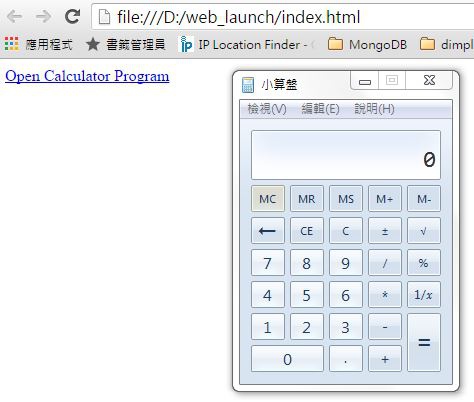
Launching an executable file from a HTML page
1. Write a REGISTRY program and load it to the registry.
Come up with a file named "run.executable.file.test.reg" containing the following content and double click on the file to load it to the registry:
DanBrother 發表在 痞客邦 留言(0) 人氣(20)
robocopy D:\Data E:\Data_Copy /DCOPY:T /E /XO
/DCOPY:T :: 複製目錄時間戳記。
/E :: 複製子目錄,包括空的子目錄。
/XO :: 排除較舊的檔案。
DanBrother 發表在 痞客邦 留言(0) 人氣(172)
File Backup Check Batch File (Windows) (files_backup_check.bat)
PS. You may download the executable sendEmail program file via the following link:
https://docs.google.com/file/d/0B4Tn2CQhyQfvdW5FZDV6TjU4SGM/edit?pli=1
files_backup_check.bat 內容如下:
DanBrother 發表在 痞客邦 留言(0) 人氣(9)
How to make a windows batch file (.bat) delete itself while running?
[Solution]
Put the following content at the end of the (.bat) file.
-----------------------------------------------------
call :deleteSelf&exit /b
:deleteSelf
start /b "" cmd /c del "%~f0"&exit /b
-----------------------------------------------------
DanBrother 發表在 痞客邦 留言(0) 人氣(56)
如何設置Notepad++ 開啟時不打開上次未關閉的所有文件?
解答:
(v6.5.1)
自訂->
使用者自訂 ->
其他 -> 記憶此次開啟文件(不打勾)
-> 關閉
-> 重新啟動Notepad++即生效
DanBrother 發表在 痞客邦 留言(0) 人氣(3,441)
如何在UltraEdit中正常顯示韓文?
1. 使用Notepad(筆記本)開啟原韓文檔
2. 格式 -> 字型 -> 字型設定為為Gulim , 字集設定為韓文 -> 按確定 -> 另儲新檔 (編碼選為UTF-8) -> 存檔
3. 使用UltraEdit 開啟此檔案,即完成
DanBrother 發表在 痞客邦 留言(1) 人氣(192)
 WinSCP – Set up Public and Private Key Authentication to transfer files between Client and Server:
Server Side (Linux):
-- Generate SSH public & private keys.
-- Be sure to enter passphrase twice
[test@Server_A .ssh]$ ssh-keygen -t rsa
DanBrother 發表在 痞客邦 留言(0) 人氣(63)
